
What Is a Construction Project Tracker? Benefits, Features, and How General Contractors Use them.
In construction, small things can become big problems fast.
You already know this. A delivery shows up late. Someone forgets to update the schedule. A change order sits unread in a text message. Or worse, your crew rolls onto the site only to find out the last subcontractors haven’t finished their Job.
Suddenly, you’re behind. And you’re the one explaining it to the homeowner and trying to quickly reschedule the subcontractor that cannot start their work yet.
Most GCs have lived this more times than they’d like to admit. The actual work? That’s usually fine. What kills your flow is poor coordination.
That’s why more GCs, remodelers, and subs are turning to a construction project tracker. Not because they love software. Because they’re tired of the unexpected. Does that mean the unexpected should become expected? No, don’t confuse me.
If you’re still running jobs with phone calls, spreadsheets, notebooks, and a pile of random texts—you’re not alone. Plenty of construction businesses start that way. But here’s what happens: jobs get bigger, your team grows, and homeowners expect more. Eventually, that old system starts to crack. You need something better. Something that doesn’t leave you chasing updates all day.
Let’s break it down.
What Is a construction Project Tracker?
In plain words, a construction project tracker is a tool—usually software—that helps you organize and keep an eye on every part of a job.
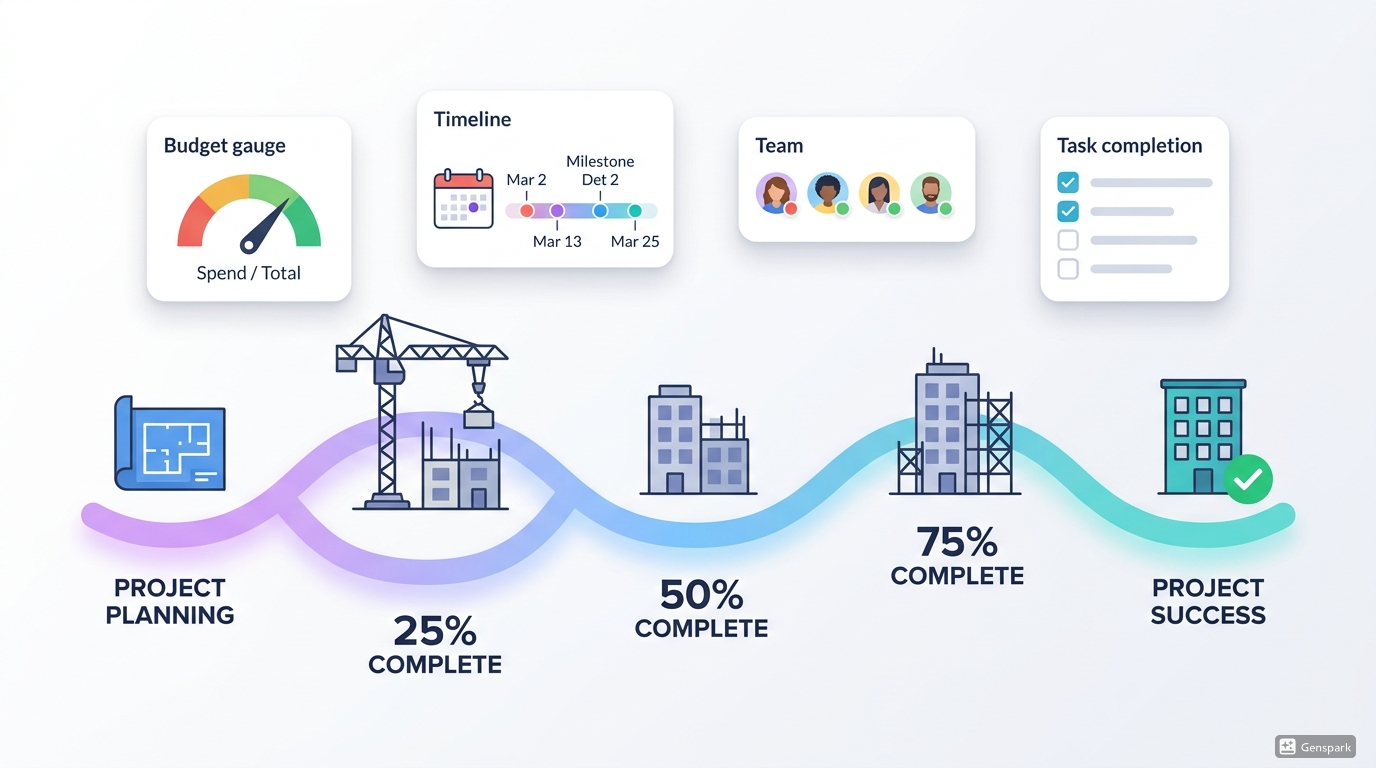
It gives you one spot to track schedules, tasks, deadlines, budgets, documents, progress, team chats, and updates.
Think of it as your answer machine for the questions that pop up a dozen times a day:
- Where does the project stand right now?
- What’s actually finished?
- What’s falling behind?
- Who’s supposed to do the next thing?
- Are we still on budget?
- Did the homeowner sign off on that last change?
Without a good tracking system, those answers are scattered everywhere. Emails. Texts. Paper. Your memory. That might work for a while. But once you’re juggling multiple projects, jobs and more than a handful of subs, it gets risky fast.
A solid construction project tracker pulls everything together. Instead of always reacting to problems after they blow up, the system helps you spot them early and fix them before the whole job goes sideways.
Main Benefits of Using a construction Project Tracker
There’s a real reason small contractors and big firms are both jumping on this. The right system saves you time, cuts down mistakes, and makes life smoother for your team and your clients.
1. Better Visibility Across the Entire Job: The biggest win? You can actually see what’s going on. Not guess. Not call around. See. You know what’s happening right now, what’s coming up next, and what needs your attention before it turns into a disaster. That kind of visibility is nearly impossible when you’re piecing together info from five different places.
When everything lives in one spot, you stop wondering. You know which tasks are done, which ones are late, and where the project stands.
2. Stronger Team Coordination: Construction runs on timing. One crew can’t start until another finishes. If that handoff is fuzzy, you get delays.
A project tracker keeps everyone on the same page. Office folks, field crews, project managers, subs—all aligned. That means fewer “I thought you were handling that” moments. Less back-and-forth. Fewer missed steps.
3. Easier Schedule Management: Schedules change all the time. Weather. Inspections. Materials showing up late. Lumber price increases. Design tweaks. It never ends.
A good tracker lets you adjust things fast without losing the big picture. You can move milestones, update deadlines, and make sure the next phase still makes sense.
4. Better Budget Awareness: Here’s a trap a lot of contractors fall into: the job looks fine on the surface, but costs are quietly creeping up underneath.
When you track progress and costs together, you protect your margins. Labor, materials, change orders—all tied into one system. You’ll see if a job is drifting off budget before it gets out of hand.
5. More Professional customer Communication: Homeowners just want to know their project is under control. They do not like vague updates and last-minute surprises.
When you use construction progress tracking software, you can share real updates easily. Show them what’s done, document changes, and give them confidence that you’ve got it handled. That trust pays off in reviews, referrals and repeat work.
Features to look for in a construction Project Tracker
Not every tracker works for construction. Some are too generic. Others are so complicated you’ll spend more time learning them than actually working.
The best tracker is one your team will actually use—without complaining.
Here’s what actually matters.
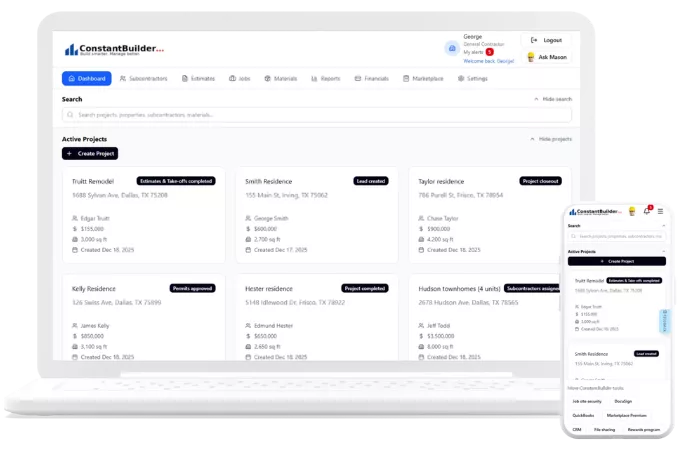
1. Centralized Project Dashboard with Alerts: You should be able to open one screen and quickly see where things stand. A clean dashboard that Alerts you to the most important things saves time and shows you what needs your attention first.
2. Task Assignment and Deadline Tracking: continuous construction means constant follow-up. Your tracker should let you assign tasks, set due dates, and see what’s done—so nothing gets forgotten or pushed back.
3. Scheduling and Timeline Management: Look for something that helps you build schedules, update timelines, and track milestones. You shouldn’t need a separate tool just to plan.
4. Budget and Cost Tracking: You need to see estimated costs, actual spending, change orders, and payment status all in one place. Profit often comes down to catching problems early.
5. Document and File Storage: Plans, contracts, invoices, permits, site photos, approvals—all of it should live in one organized spot. Digging through email & text chains for a single file wastes time and adds risk.
6. Progress Updates from the field: What happens on site matters just as much as what gets planned in the office. Make sure your system lets crews or managers update job progress while they’re actually there.
7. Mobile Access: You don’t work behind a desk. If the software only works well on a computer, nobody will use it. Mobile access with voice assistance isn’t a bonus anymore—it’s a must.
How Contractors Actually Use a construction Project Tracker
Real contractors don’t use these things because they like shiny software. They use them because jobs run smoother with a Tracker.
Take a remodeling contractor. They might have four kitchen and bathroom jobs going at once. Instead of keeping separate notebooks for each homeowner, they open one system to see schedules, material status, homeowner selections, and what’s outstanding.
Or a home builder. They track every phase of a new build—permitting, foundation, framing, electrical and plumbing. Then there’s the final walkthrough and closeout. If one stage gets delayed, they adjust the timeline right away and let the next crew know before the whole schedule slips.
A commercial contractor can use it for even bigger coordination: approvals, paperwork, sub responsibilities, and client reporting across massive jobs.
Even small teams benefit. In fact, smaller contractors often feel the value faster because they have less room for mistakes. When your business runs on tight schedules and steady cash flow, staying organized isn’t optional.
Signs You Need a construction Project Tracking Tool
A lot of contractors wait too long to upgrade to a software solution. If you’ve ever caught yourself thinking, “We’re making it work,” but deep down you know it feels messy—that’s a sign.
You probably need a better tracker if:
- You’re managing multiple active jobs at once
- Important updates keep getting lost in calls, notebooks, texts, or email threads
- Schedules change frequently and staying aligned is difficult
- Homeowners ask for updates and it takes you too long to gather the info
- Your documents are scattered across too many different places and you’re not sure which version is which
- Budget tracking feels like you’re always reacting instead of staying ahead
- Your team relies too much on memory instead of a real system
These problems are common. But they shouldn’t be your normal.
Choosing the Right Construction Management System Software
Here’s the truth: the best tracker isn’t the one with the most bells and whistles. It’s the one that fits how your business actually works–without customization or weeks of training.
Some contractors need deep reporting and serious job costing. Others just want a clean, simple way to handle schedules, communication, and progress in one place. The key is picking software that supports your workflow—not one that makes everything harder forcing you to adapt to the software.
When you’re comparing options, ask yourself these real-world questions:
- Is this actually built for construction, or is it just generic project software?
- Will my team actually use it?
- Can I get to it from my truck, the job site, or from home?
- Does it save me real time each week?
- Will it grow with my business?
If you’re answering yes, you’re headed in the right direction.
Final Thoughts
A construction project tracker isn’t just a fancy checklist. It’s a smarter way to handle the daily grind of construction project management.
When your schedule, tasks, communication, files, and progress updates all live in one place, jobs get easier to control. Your team stays aligned. Homeowners get clearer updates. And you spend less time chasing down details and more time actually running your business.
That’s the real value.
If your current setup feels scattered, stressful, or like it’s barely keeping up, maybe it’s time to try something more reliable. The right construction progress tracking software can help you stay organized, avoid costly mistakes, and keep every project moving with less confusion.
And if you’re ready for a simpler way to manage jobs from start to finish, give Constant Builder a try for project tracking. https://constantbuilder.com/signup
FAQ
A construction project tracker focuses specifically on monitoring tasks, milestones, schedules, and progress across job sites. Construction management software is broader — it includes project tracking plus estimating, invoicing, vendor payment, material ordering, and client management. ConstantBuilder combines both in a single platform, so contractors get full project tracking plus the financial and communication tools needed to run their business from one place.
Constant Builder does—and for construction teams, mobile access is not optional. Field crews do not work from desks, so construction progress tracking software must function reliably on smartphones from any job site. Constant Builder is built mobile-first, allowing GCs, subcontractors, and field supervisors to view schedules, upload progress photos, log time, and communicate from any device without needing a desktop computer or going to the office to login. This is particularly important for crews working across multiple job sites simultaneously.
Homeowners use construction progress tracking software through a dedicated homeowner's portal that gives them real-time visibility into their build without disrupting the contractor's workflow. Through Constant Builder's homeowner portal — which is free for all homeowners — clients can view daily progress updates and photos, see their project schedule and milestone completions, submit punch list items, and track warranty items after handover. This transparency dramatically reduces the 'status call' interruptions that consume GC time on residential projects.
Yes. A multi-project dashboard is one of the primary advantages of a dedicated construction project tracking tool over a spreadsheet or general app. Constant Builder allows general contractors to view all active projects in a single dashboard, switching between jobs instantly and seeing the status of each without logging in and out or opening separate files. The AI assistant surfaces the most urgent items across all projects each day, so nothing on any job site falls through the cracks.
Yes, the same progress tracking software can be used for high‑rise commercial projects and single‑family home builds by configuring tasks, phases, and cost codes for each project type.
Yes, subs can log daily work, upload photos, and update quantities directly in the software, giving GCs verified progress data for pay applications and reducing back‑and‑forth on site.
With tight schedules, a construction project tracker provides real‑time dashboards that show schedule, budget, and progress data, helping teams respond quickly to change.
Remodelers can track selections, change orders, and daily progress in one tool, so homeowners see transparent updates and fewer surprises during renovations.